.. or is that just me?
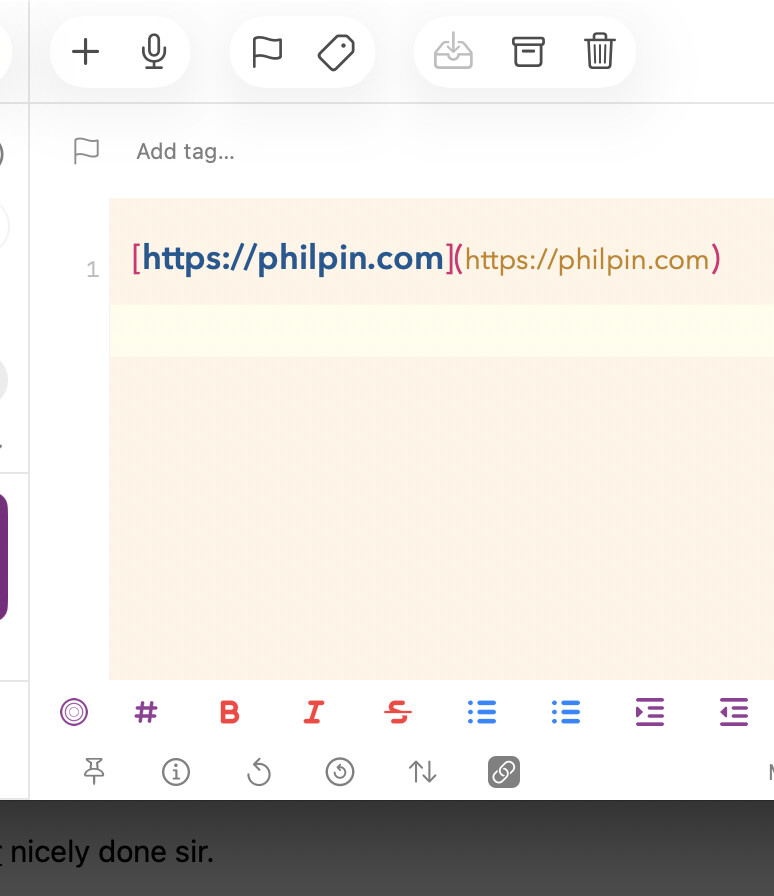
I tried a couple of links (after the update, and on an iPad) in two different drafts and they both worked. I don’t know what to suggest next though.
SO GAVE ME AN IDEA - same link on an iphone works - rebooted Mac - because why not - still no love -
There is no explicit explanation of exactly what your expectations are in terms of “broken”, so I have done some experimenting on Drafts on the Mac (I’m running51.1 (766) on Tahoe 26.2), based on your screenshot, and recorded some observations below.
Taking your shown link as the basis, I tested the following lines:
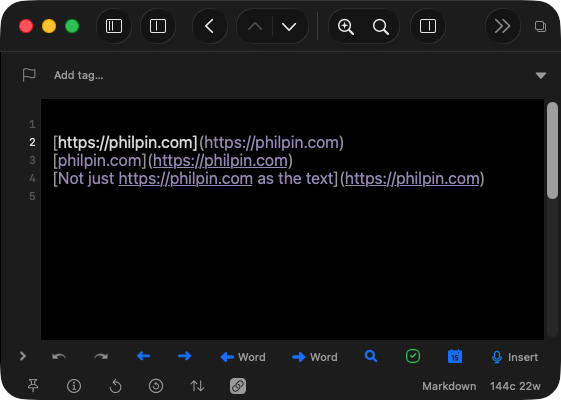
The results for the (vanilla) Markdown syntax were that:
- The first line’s URL component of the link is not underlined, but is clickable.
- The second and third lines URL components were also clickable, and they were underlined.
- The URL within the text of the link in the third line is also underlined and clickable.
Changing to MultiMarkdown, GitHub Markdown, or any of the other Markdown-based syntaxes I have installed or created, the look remains the same in terms of what is underlined, but the first line’s URL component is then no longer clickable.
Thank you for looking - and what you describe is what I would expect and until recently always got - but now not getting.
I have also found that my action on ‘styled preview’ is also not working - so beginning to wonder if there is something at my end. I use ‘markdown’ as my default - so unclear what might have changed - might start with a fresh install.
Or maybe Claude and I will have a chat first.
ONWARD
New update of Drafts on Mac Store has fixed the problem - thank you @agiletortoise