I’ve noticed this issue for about a month, and I’m not sure if something in the settings has changed. It might be my mistake, so please consider this bug report lightly.
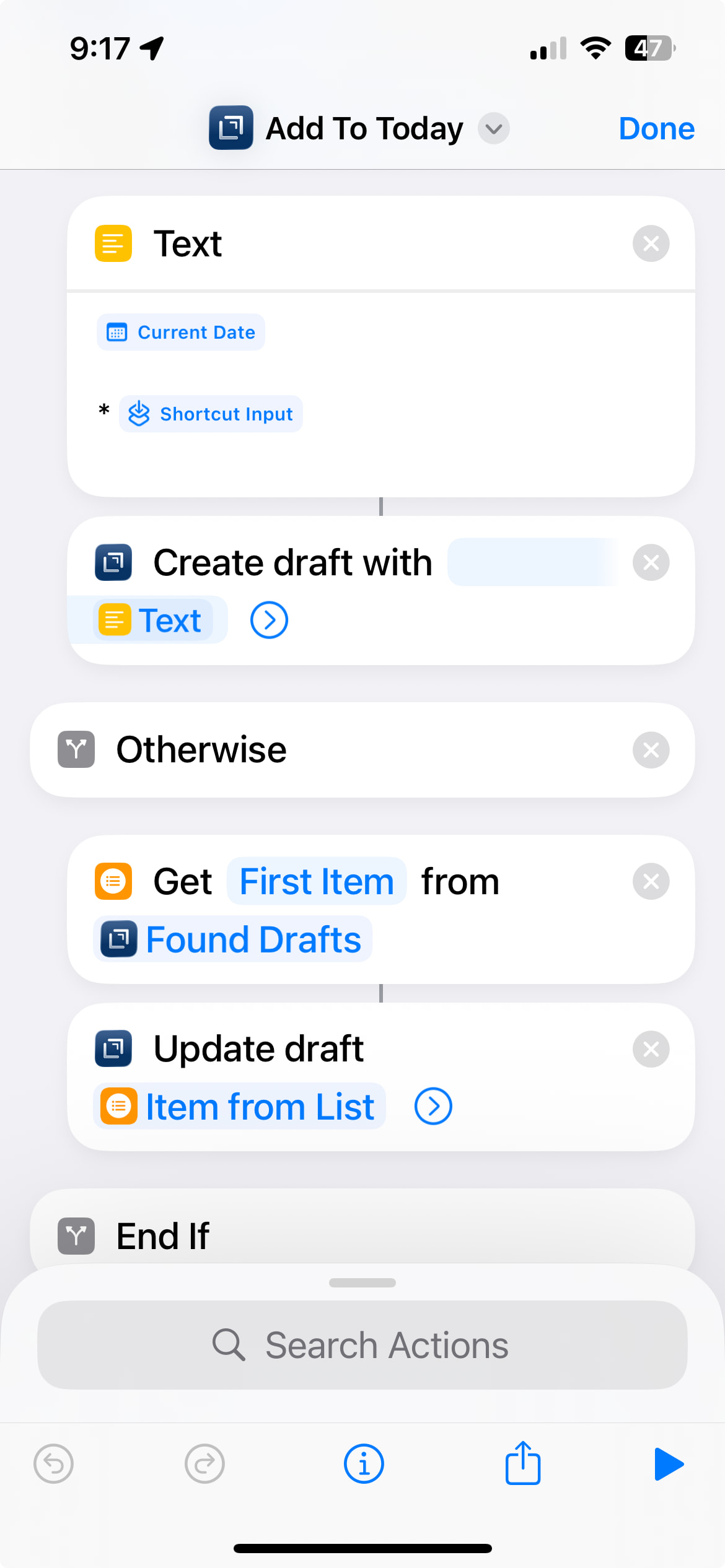
Some of my drafts, which always used markdown, are now occasionally reverting to plain text. I’m updating these drafts using iOS automation (similar to this one), while others remain unaffected—it seems the automation might be the cause. Does anyone have ideas for debugging this?
Also, am I correct that the syntax setting applies per draft rather than globally?
Thanks!
There have been some changes recently that have had other impacts on syntax. I’ve not experienced this myself, but others might. It will be interesting to see.
You probably want to note your device, OS version and Drafts version. These things matter for validating issus.
Another key question is can you reliably reproduce this issue? If so, what are the steps?
The syntax is defined globally, but you apply it at the draft level. So you set the specific syntax for a draft (and you can change it later), and all drafts with that syntax us the same definition.
1 Like
Yes, reliably reproduced.
Any automation like the one here switches it to plain text for all synced devices. I don’t see anything related to syntax or other properties in the automation.
iOS 18.7.2
Drafts always latest (issue prevails for at least two updates already)
This is the relevant part that creates a draft:
What do you see if you expand the update draft action in that shortcut? There’s an option in that step to change the syntax.
1 Like
Cool! Changed to markdown now. Thanks.
Is that option new?