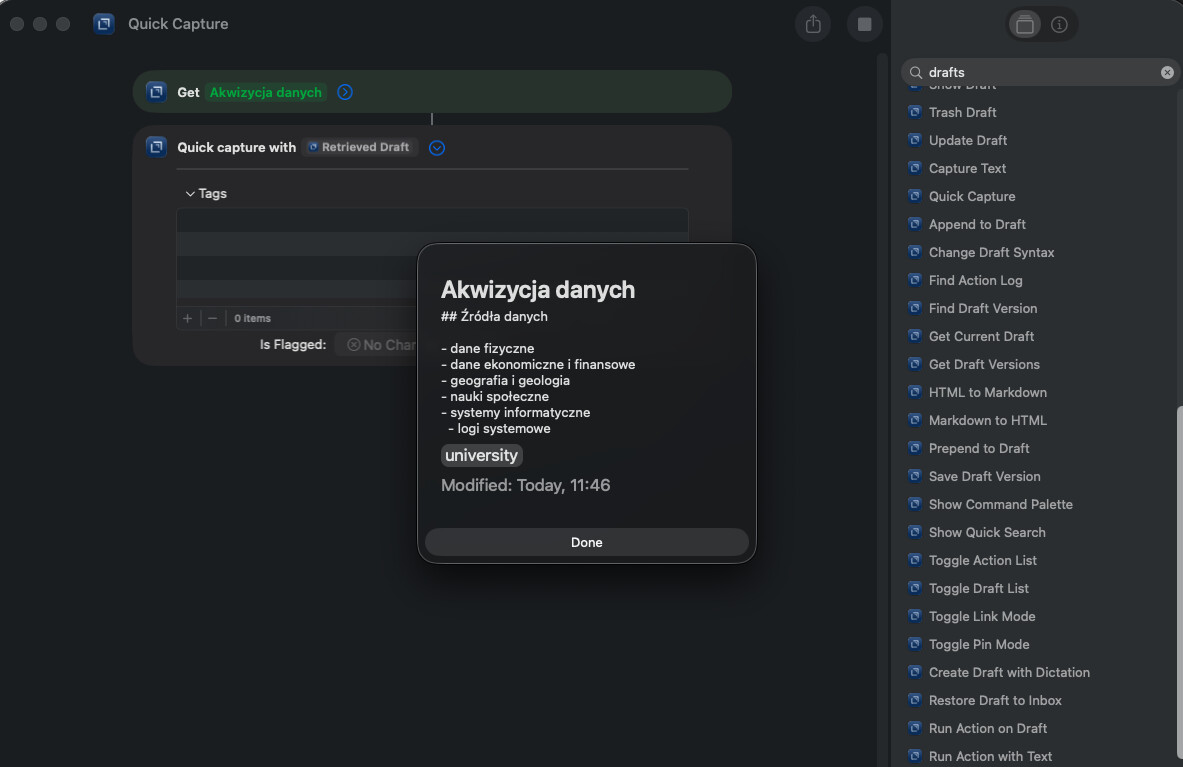
Hi
I know about append/prepend in Capture window, but it not show previous text. Is any chance to expand this functionality in such way, that user can to load text from selected existing Draft to the Capture window and continue with it?
I started using Capture to make notes while in another application but many times it would be helpful to see what I previously wrote or just to put new part in selected section of previously created note (not append/prepend).
Thanks
Piotr
This is a pretty specific request. I think you might be better off with a shortcut for a workflow like this. Perhaps one that puts the share sheet content in the clipboard, then opens a draft for you in Drafts. You could then manually modify and paste the content where you wanted it.
That is not what I exactly need, I rather need Capture window with text from selected Draft. I’ve tried to do this using simple flow consist of “Get Draft” and “Capture with Text “( getting text from previous step), but “Get Draft” shows wIndow with part of Draft text and wait for pressing “Done” button.
It will be very good to get text from Draft without presenting window (I think that such Action can be used in many other situations and shortcuts).
I’m a little confused on what you’re trying to accomplish. It sounds like you just want to edit a draft? Why does it need to be in the capture window?
Because Capture Window I always over other windows - so I can see it even when I use Cmd-Tab too switch between windows - it is always on top. Very important for me.
Any Drafts window can float on top of other windows. Toggle that with the icon in the top right of the window or with the float on top option in the view menu.
Thanks
So I inattentively read the manual - I will check how it first in my expectations.
Anyway I want to ask what is the reason to display this dialog with confirmation in Get Draft action? It block flow of any Shortcut in the stage where this action is used"? Maybe the flag show/don’t show would be better?
That’s just a configuration option on the shortcut action. Most have the same option turn off “show when run”