UPDATE 2026-01-15: Finally found a workaround for this issue. The fix will be in v50
iPadOS 26 continues to have a few, well, interesting problems, especially around the interaction of the Action Bar and an external keyboard. This was more severe, causing a crash using any menus in earlier releases of 26.x, and has gotten better, but remains a problem in the following scenario:
- You have an external keyboard connected.
- You have the Drafts Action Bar visible
- You make a text selection, show the edit menu (cut-copy-paste) and tap the
>to expand the text selection menu for options.
If you do that, Drafts will hang and show a wonderfully half rendered Liquid Glass lens-like thing where a menu should appear…like:
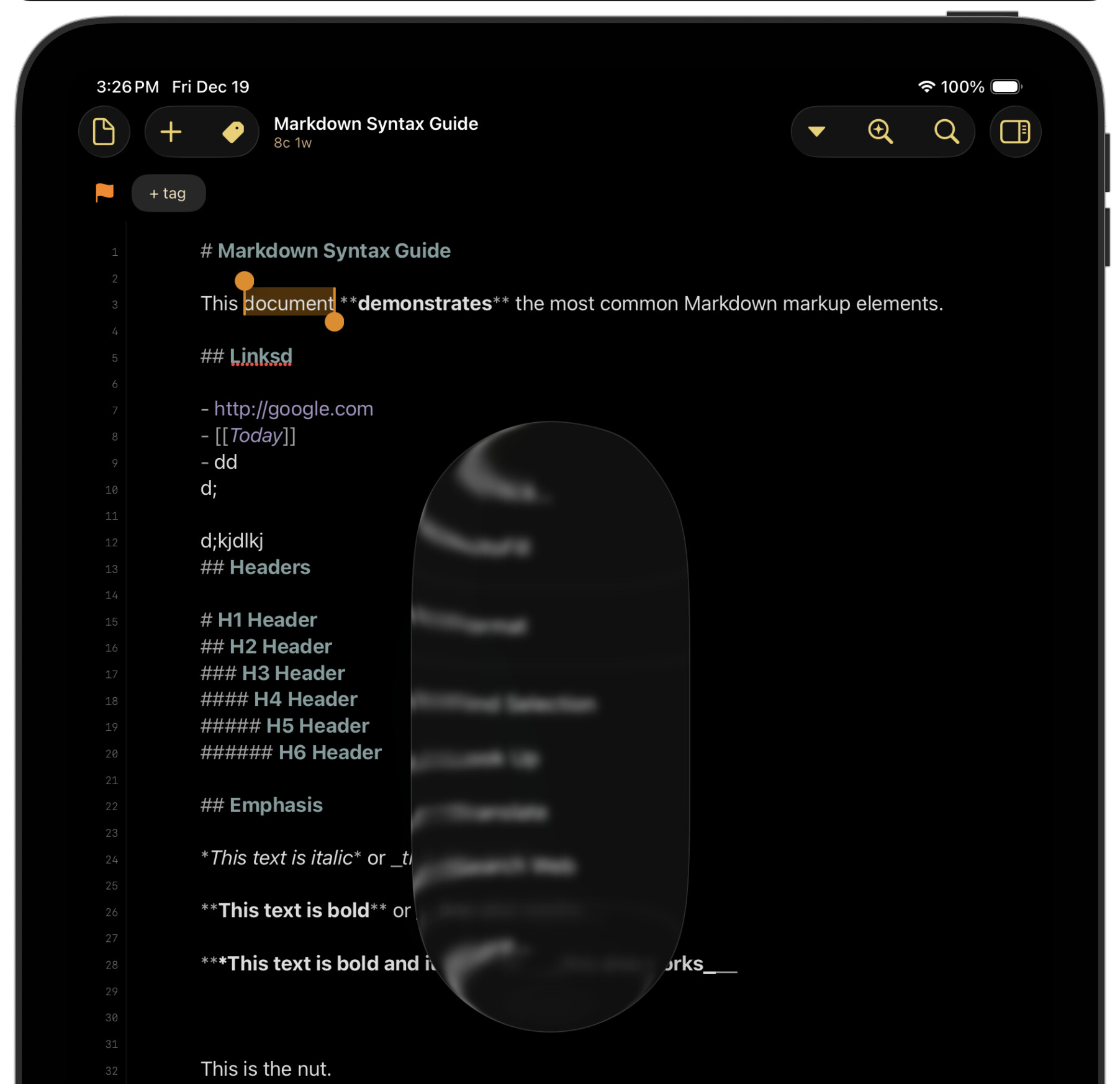
I have reported this issue to Apple (FB21382563 - Apple folks!), but, as yet, have not found a way to prevent it from happening in these specific set of circumstances.
So, in the meantime, I generally recommend that if you are an iPad user, who regularly uses an external keyboard, you set the “Hide Action Bar” option in Drafts’ Editor Settings to “Always” for now. Which will avoid this issue completely.
You can still get to your Action Bar actions using the (>) button in the iPad’s keyboard shortcut bar while editor (or, of course, via keyboard shortcuts).
I will post updates to this thread as they become available.