Drafts 53 has been released:
Details below. For a complete history of updates, visit the release notes.
53.0
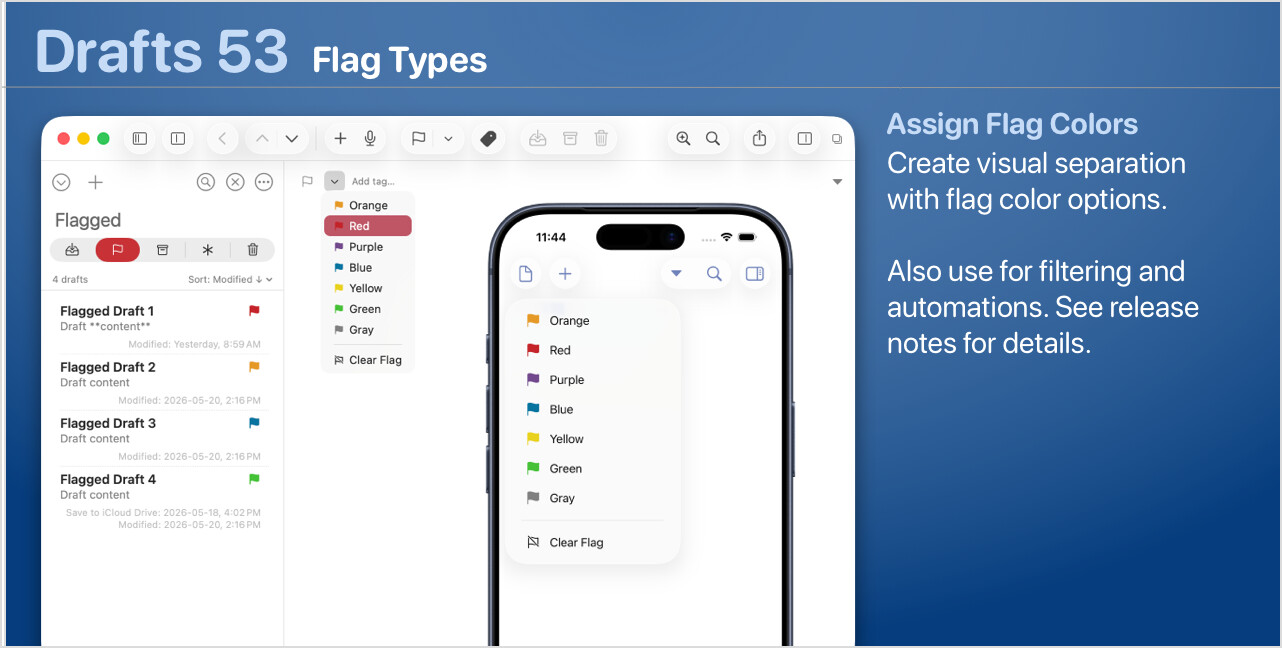
Flag Types
In addition to toggling flag status on and off, you can select flags in different colors for visual separation. These function similarly to flags in Apple Mail and are available via several methods:
- iOS
- Long-press the flag toggle button for the types menu in the tag entry area above the editor.
- Using the long-press contextual menu on drafts in the draft list.
- Mac
- Use the down-arrow next to the flag above the editor or in the Window toolbar to select.
- Use the contextual menu on drafts in the draft list (including multiple selections).
- Use the “Flag” options in the File menu.
To filter by flag types in searches, use the flag:type token, which can accept either numeric or type name values, e.g. flag:red or flag:1 (more on filtering)
You can also read, update, and query flag types in scripts, or via Shortcuts and other automations.
A few notes:
- Scripting:
- By default, the flag types map to system tint colors on Mac, and the
tintXXXcolors in your current theme on iOS. Optionally, a theme can modify flag colors by includingflagType00throughflagType06interface colors to modify tints applied.
Other Updates and Changes
- All Platforms
- Change: Loosen up parameter requirements for
Draft.queryand give better log messages for invalid parameters - New: “Find Draft” app intent now supports filtering by flag type.
- Change: Add flag type support to Shortcuts actions.
- Change: Better access to version history through menus.
- Change: Loosen up parameter requirements for
- iOS
- New: Add menu option to toggle Live Activity for a draft to draft list contextual menu.
- Mac
- Change: Add
flagTypeproperty to drafts returned in AppleScript. - Fix: Capture window not allowing vertical resize if list collapsed.
- Fix: Find next/previous buttons and shortcut (cmd-G, shift-cmd-G) in advanced find.
- Change: Add option to reset AppleScript/Shell permissions bookmark in Settings > Credentials for the case where the user inadvertently navigates away from the correct folder when initially prompted when running an action that uses local scripts.
- Change: Make some changes to editor insertion point drawing to try to avoid weird issue where cursor gets drawn multiple times.
- Fix: Override hit testing in Modern editor mode to better catch clicks on links (like task marks) and avoid Text Kit 2’s weird fails at character boundaries.
- Fix: Additional refresh mechanisms for Modern editor mode to mitigate remaining cases where the editor can be unscrollable.
- Fix: Export context menu item should work on syntaxes in Editor Settings’ Editing tab.
- Change: Tag suggestions should not include tags already assigned.
- Fix: Case where pausing dictation would lose the last update to text.
- Change: Add