Drafts 51 has been released:
Details below. For a complete history of updates, visit the release notes.
51.0
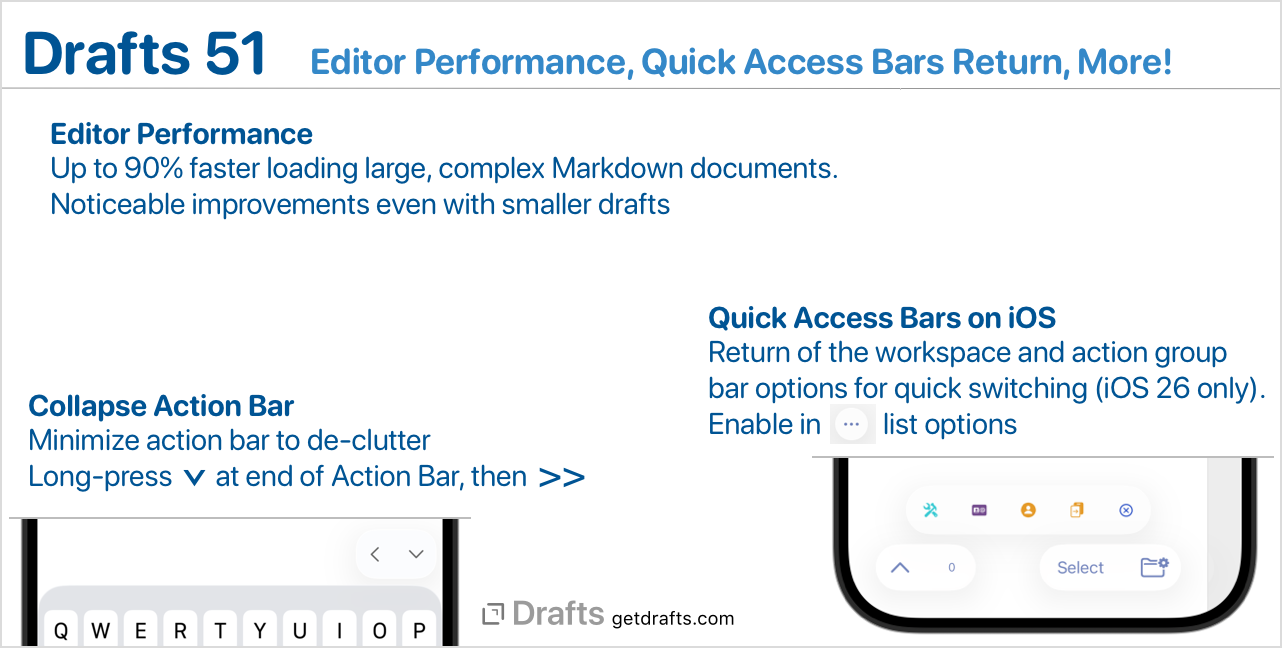
Editor Performance Improvements
This update significantly improves syntax highlighting performance in the Drafts editor. On both iOS and Mac, using either the default legacy editor, or the new “modern” editor. If you work mostly with shorter drafts, or drafts with little complex markup, this may not be very noticeable. Still, if you often load or work with long documents, especially with a lot of Markdown or other highlighted content, the difference is significant. Especially evident in operations that require evaluating the entire draft, such as initial load in the editor. Load time improvements are as much as 90% for very long and complex drafts, and still a noticeable 20% or more for more typical drafts.
Return of the Workspace & Action Group Bars on iOS
This release brings back the “Workspace Bar” and “Action Group Bar” options to the iOS version (requires iOS 26 or greater). These bars display a scrolling horizontal icon display of your workspaces or action groups below those lists for quick switching. The menu already provides this functionality, but some of you really prefer the icon-style view, and we heard you.
To enable in either the draft or action list, look in the (…) list options menu above the list.
Action Bar Rewrite on iOS
Without getting too technical, the Action Bar on iOS has always been implemented using an API provided by Apple to attach an accessory to the keyboard when displayed. This API has become increasingly problematic, especially on iPad, leading to a variety of minor issues. In this release, the Action Bar has been re-implemented using a different method. Ideally, this should not be noticeable, but more reliable.
In this process, the Action Bar also learned a new trick. You can now temporarily collapse the Action Bar to reduce distractions. To do this, long-press the downward arrow at the right of the bar, then press the >> button to minimize.
Other Updates and Changes
- All Platforms
- Change: A variety of improvements to the “Modern” Editor mode.
- Change: The “Host” field in Mastodon action steps now supports template tags to allow configuration and dynamic values.
- Change: List widget now has a new configuration option to restore the previous behavior of displaying only a single draft from the workspace.
- Change: Allow workspaces to load the trash tab when applied.
- Fix: Crash filtering action logs by status in Shortcuts.
- Fix: Initial load of text in editors not always styled correctly.
- iOS
- Fix: Better avoid traffic light buttons when iPad is in windowed mode and “hide top toolbar while editing” is enabled.
- Fix: Always hide the action bar if Writing Tools are active.
- Change: Rewrite “Highlight Insertion Point” implementation to work more reliably and be more performant across legacy and modern editor modes.
- Fix: Selected arrange mode not updating in the menu.
- Mac
- New: “File > New Draft in New Window” menu command.
- Change: Work on mitigating cases where scrolling can become disabled in the Modern editor.
- Fix: Changing font size does not always update in the editor right away.
- Change: Change the load next behavior after moving an item in the draft list to make it more consistent with the behavior of Mail/Notes and other apps, with a detail more strongly linked to the navigation list.
- Fix: Avoid text in the editor flashing in the wrong font when re-opening a window.
- Fix: “Hide Toolbar” not being persisted across restart of app.
- Change: Support for
open workspace "Name"in AppleScript. - Fix: Issue where paragraph number gutter could eat some clicks intended for the Action Bar.