Drafts 50 Teaser - Automation Improvements

I’m starting work in earnest on what will be the Drafts 50 release, and though I don’t generally pre-announce new features, I thought it would be a nice New Year’s gift to drop a teaser of what’s coming.

This release will focus on two areas of automation…

Improved Shortcuts Integration

Drafts has always had good Shortcuts integration, but I wanted to make it great. Especially since it will be the basis for many promised improvements to Apple Intelligence in the coming year, I wanted to go over what I’ve got, improve the implementation details, and fill in any gaps, exposing Drafts functionality through Shortcuts.

I’ve been working with Shortcuts Guru Matthew Cassinelli auditing and suggesting improvements, and these will be rolled into the v50 release.

I’m excited about the project and expect it will bring a new level of automation capabilities to Drafts, and make it fully ready for whatever’s next from Apple.

AppleScript Support

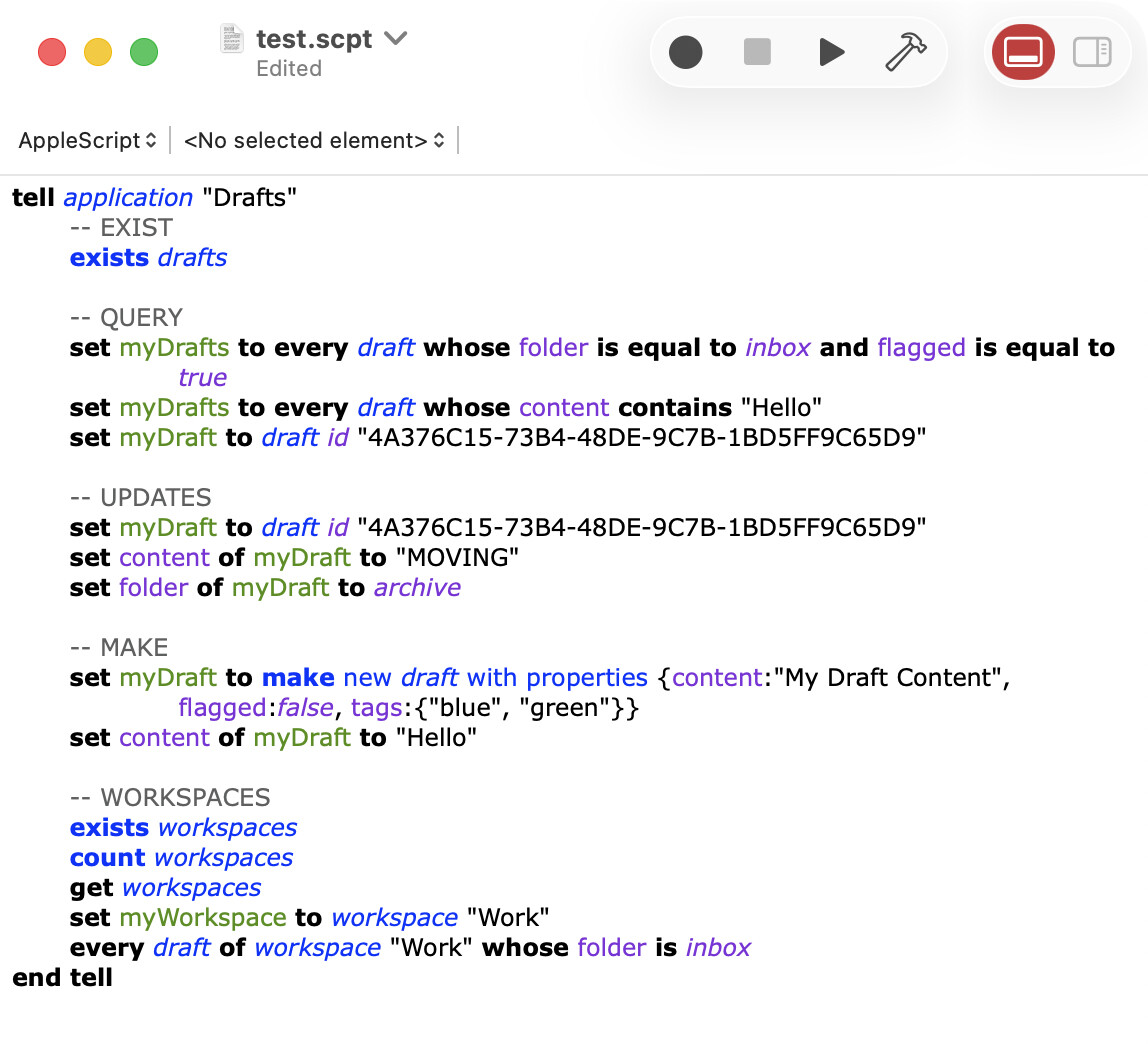
If I’m fully supporting the “new” thing, I should also fully support the old, tried and true automation options, so in a move that should fairly fall in the “finally” category, but I’m also working on fleshing out a fuller array of AppleScript integrations. Currently, you can create drafts via AppleScript, but that’s about it…in this release, full access to your Drafts library will be available to query, update, process, etc., via AppleScript.

Including an example below of some of the abilities that I already have implemented to give you an idea of the possibilities. This will allow better integration with a number of tools on Mac, and better AI integrations through tools like AppleScript MCP.
Time Frame

This work is all still in process, but moving along quickly, and I hope to be able to ship this release by February 2026, so stay tuned.

20 Likes

Really looking forward to seeing this come through. Thanks for the advance notice of intent Greg :clap:t2:

1 Like

I’ve always considered Drafts to be an exceptionally good citizen when it came to Shortcuts. The relatively recent introduction of the ability to run actions in the background via Shortcuts has been a particular boon when used with Personal Automations. Can’t wait to see where you take this next. Thanks for sharing.

1 Like

I can’t wait to discover the Shortcuts part to come. I’ve lost count of how many Shortcuts I use in connection with Drafts: whether they are launched in a script within Drafts or end up there, I really have a lot of them, with a fairly advanced level of integration to link data between Drafts and other apps. So I’m eager to see what an even deeper integration could bring.

1 Like

This is exciting news, Greg! In particular, it would be awesome if there was a simple way to open a new draft in a standalone window. For example, with BBEdit, I often use this:

tell application "BBEdit"
  make new text window with properties {contents:theContents, name: theWindowTitle}
  activate
end tell

I’d especially appreciate the ability to open a new window without the main Drafts window visible behind.

1 Like

How would you be using that? Sounds like a job for the capture window to pop over other apps and capture text, which is already possible with the “Show Capture” shortcut action, or the drafts://capture?text= URL scheme.

Thanks for the reply, Greg.

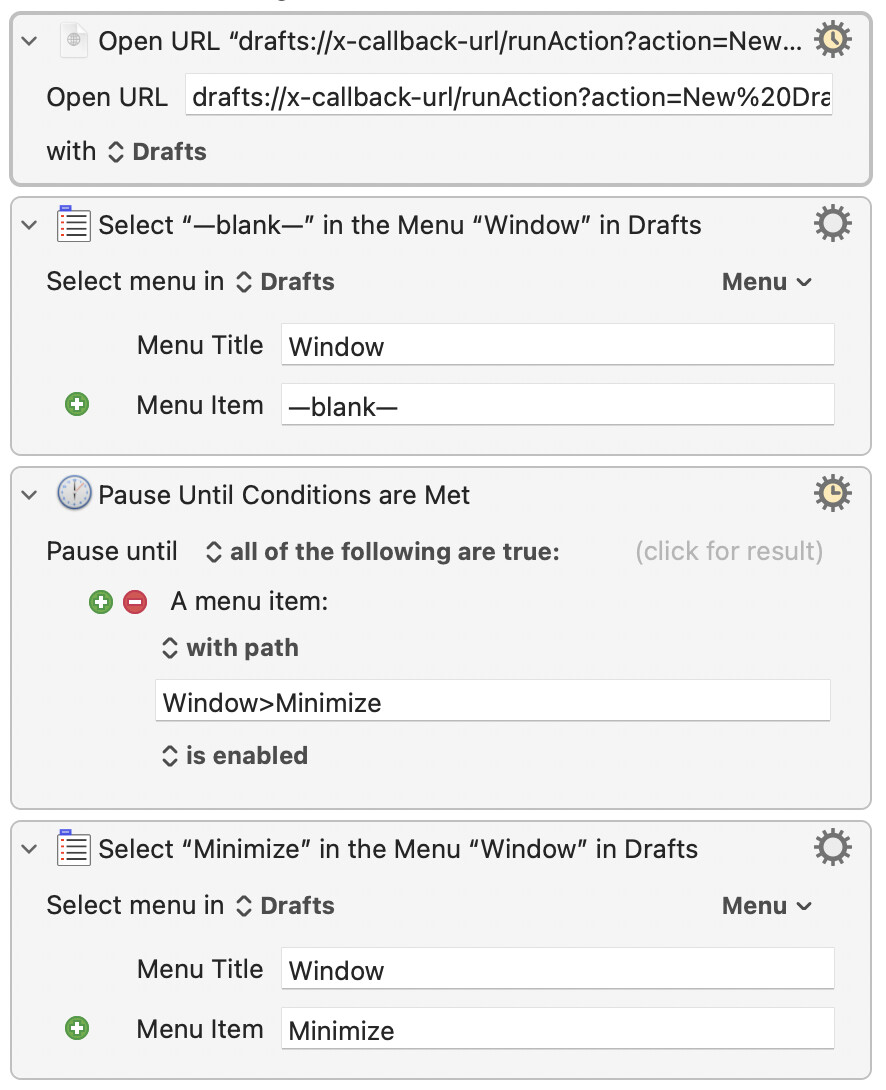
I sometimes use the Capture feature, but IMO, it would be nice if there was an option to open it with the main Drafts window minimized. I’m currently using Keyboard Maestro to: 1) open Capture, and 2) minimize the main window.

Other times I want the characteristics of a regular window, but ideally detached, again with the main window minimized.

On a related note, it would be really nice if there was a new menu item: File>New in New Window (of if File>New changed to that with the option key down).

Thanks for considering this feedback.

1 Like

It’s a pretty simple action to open a new window with a blank draft.

Great. Looking forward to the TestFlight. I do quite a lot with AppleScript these days.

This action opens a blank tab for me, not a blank window. What could be wrong in my setup?

Tabs are windows, technically. This is a system behavior controlled by the setting “Prefers tabs when opening documents” in System Settings > Desktop & Dock

Thanks, Greg. That works well.

So to achieve my objective:

I’m using this simple Keyboard Maestro macro: